Apple kicked off their
2013 Worldwide Developers Conference (WWDC) on Monday, where the company unveiled new products and made some important announcements. Here are our thoughts on the big stories that emerged.
iOS7 Update
The most important announcement at WWDC was the update of
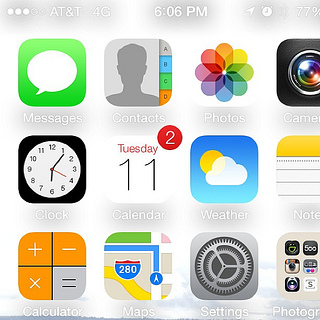
iOS7, with Apple CEO Tim Cook calling it “the biggest change to iOS since the iPhone”. Apple’s lead designer Jony Ive sees “iOS7 as defining an important new direction, and in many ways, a beginning” for the iOS ecosystem.
All of the new features and updates can be found in
Apple’s press release, but the most important changes were the new “flat”, transparent icon design and typography changes, facelifts to core iPhone apps, introduction of Control Center (providing one-touch access to connectivity and other options), a motion tracking element that allows users to see behind icons as the device is moved, improved multitasking, AirDrop to easily share content, the addition of filters to Camera, the Safari interface redesign, and improvements to Siri.
Apple took some of the best features of other mobile operating systems and third-party apps and combined them.
The flat design was definitely the most polarizing change. Some loved the new look, but
many designers were critical of it on Twitter. Flat design for mobile operating systems became popular when
Windows Phone first implemented it in 2010, and Apple has jumped on this bandwagon. The “skeumorphism” (i.e. making software apps look like physical things, e.g. the top of the iCal app looks like it’s made of leather and there are remnants of ripped paper) of iOS6 is gone, and app icons are a bit cleaner and minimalist.
Something similar to Control Center has been available on
Android for a few years, as has the motion tracking element that lets you see behind icons.
And many of the updates to iPhone apps came from popular third-party apps such as Sunrise,
Instagram, and the
Yahoo! Weather app (Yahoo!, really?!?!).
I haven’t gotten my hands on iOS7 yet, but from what I’ve seen in video and images, I think that the launch of iOS7 is an incremental improvement. I’ve never been a fan of skeumorphism (it may look nice but doesn’t add anything), so the move to flat design is refreshing. And the improvements to multitasking, motion tracking, Camera, and Safari are nice but won’t change the game.
Overall, well done on the redesign, as it’s a huge undertaking to completely rework arguably the best mobile operating system out there. But while current iPhone users will definitely be excited to upgrade, I don’t think Android or Windows Phone users are going to jump ship.
Introduction of iTunes Radio
As expected, Apple launched its own streaming music service,
iTunes Radio, to compete with
Pandora,
Spotify, and other music streaming services.
iTunes Radio has both paid and free, ad-supported versions, allows listeners to create custom radio stations based on songs and artists and discover new music through featured stations, and highlights songs trending on
Twitter. It doesn’t offer full access to entire albums of songs, like Spotify does, though.
Some described this as a “Pandora killer”. I think this is just Apple’s expected evolution in the music space that was required to compete with the litany of available music streaming services. It’ll be interesting to see how many music lovers switch to iTunes Radio.
Preview of OS X Mavericks
Apple moved away from big cat names to big-wave surfing sites with its preview of OS X Mavericks. It also incorporated a bunch of iOS-like changes to the Mac operating system.
Among the biggest improvements include:
- New tabs in Finder, which work the same way as Safari, allowing you add a tab by clicking a plus button and drag and drop tabs.
- The ability to tag individual files
- Enhanced support for multiple displays
- Ability to use Apple Maps and iBooks on your Mac, and sync to iOS devices
- Interface and performance updates to Safari, Calendar, and Notifications
- “Timer Coalescing” and “Compressed Memory” functionality to increase efficiency and save battery life
The upgrades to OS X Mavericks focused more on function than form, and I’m personally excited about seeing these changes first-hand.
Something Missing?
Ask most Apple fans about product launches at WWDC, and they’ll ask, “Did they say when the next iPhone is coming out?”
Sure, Apple updated their MacBook Air laptops, but the hardware update everyone really cares about is that of the iPhone. Will it be the iPhone 5S or 6, and when will it come out? Who knows, but many people would like to.
Apple did make some big product announcements at WWDC 2013. But while little was groundbreaking or uniquely innovative in the big picture, each of the products launched will likely improve user experiences and keep their rabid user base satisfied.
Like this post? Please share it! Then follow us on Twitter – @thorntech – and sign up for our email list below for future updates.