
StorageLink 1.1.3: Enhanced File Management and Cloud Flexibility – Drag and Drop Files to Cloud Storage

Facebook
X
LinkedIn

Drag and drop files to cloud storage

We’re excited to announce the release of StorageLink 1.1.3, packed with powerful new features designed to streamline your file management workflows and expand your cloud storage options. This update gives you more control, flexibility, and efficiency when working with your cloud-stored files. What’s New for You in StorageLink 1.1.3: • Azure File Share Support – Connect directly to Azure File Shares alongside your existing blob storage, giving you more options for organizing and accessing your files. • File and Folder Renaming – Rename your files and folders directly within StorageLink without complex workarounds. • Enhanced Folder Names – Use special characters like +, ?, &, =, <, >, and quotes in your folder names for better organization and compatibility with existing file structures. • Flexible Cloud Connections – Quickly disconnect folders from cloud storage when needed, giving administrators more control over data organization. • Stronger Security Options – Customize login session lengths and implement advanced password policies to meet your organization’s security requirements. These enhancements address user feedback and common workflow challenges, ensuring you can work more efficiently with your cloud storage. The update is live on Azure and Google Cloud, and AWS will be available soon (version 1.1.2 is available on AWS in the meantime). Ready to drag and drop files to cloud storage? We’re here to help with a free deployment plan at sales@thorntech.com. You can also schedule time with our team for 15, 30, or 60 minutes, depending on how many questions you have.

Related Posts

Try SFTP Gateway Free for 14 Days — No Server to Stand Up, No Credit Card

Trying self-hosted software normally costs you an afternoon before you’ve even decided you want it. Spin up a VM, open the right ports, work through the marketplace listing’s prerequisites, and hope the image boots the way the documentation says it will. That setup tax is
SFTP Gateway 3.9: More Control, Better Performance

A client opens an SFTP connection and never lets go. Maybe it’s a scheduled job that lost its network path mid-transfer, maybe it’s a misconfigured script retrying without backing off; either way, the connection sits open, holding a slot on your server indefinitely. Multiply that
Introducing the SFTP Gateway Product Support Lifecycle

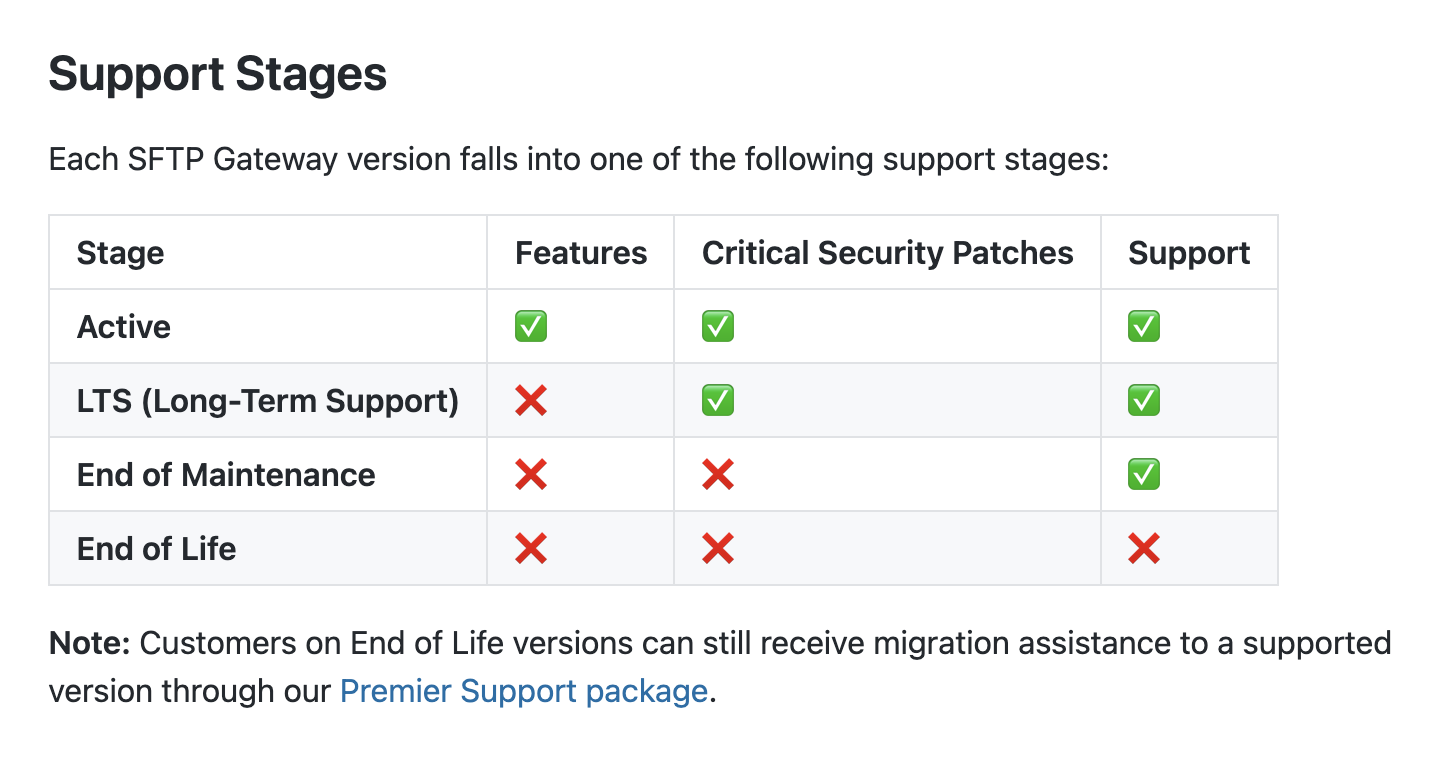
SFTP Gateway now publishes a written Product Support Lifecycle and a Version Support Calendar for every cloud marketplace, so you always know exactly how long your version stays patched, and when. Thorn Technologies is introducing the SFTP Gateway Product Support Lifecycle: a written commitment to