The SaaS File Transfer Security Problem
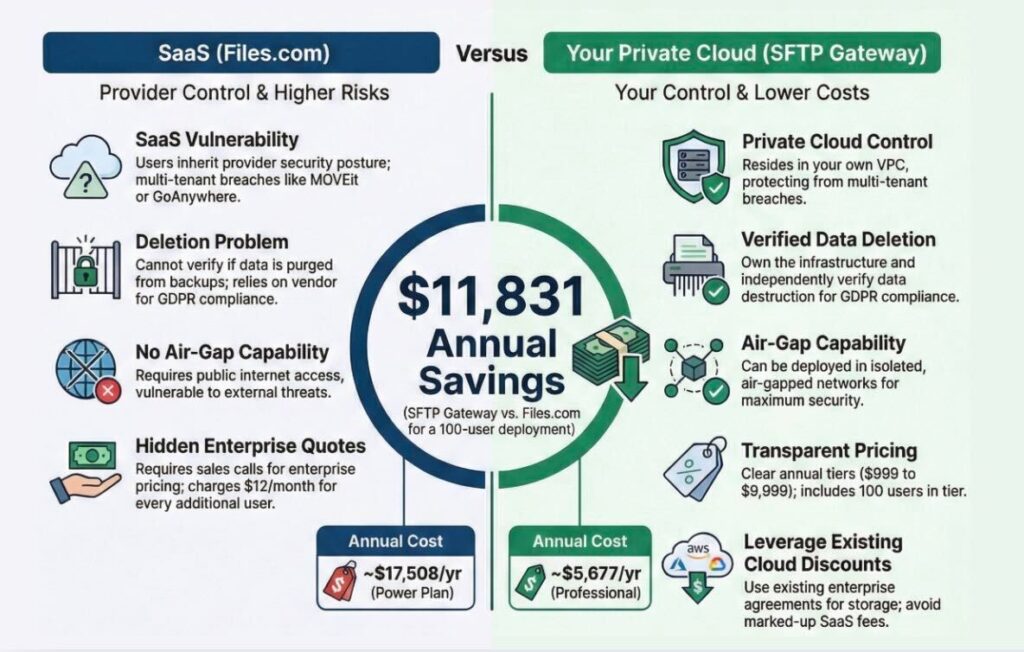
In 2023, the MOVEit data breach exposed sensitive data from over 2,500 organizations worldwide, affecting more than 90 million individuals. The attack exploited a vulnerability in Progress Software’s managed file transfer solution, a SaaS platform that gave customers no visibility into or control over the underlying infrastructure. That same pattern repeated with GoAnywhere MFT, where Fortra faced multidistrict litigation after attackers exploited vulnerabilities in their hosted file transfer service. The common thread? When your file transfer solution runs on someone else’s infrastructure, you inherit their security posture and their vulnerabilities. Files.com is a pure SaaS solution. Your data lives on their servers, in their cloud accounts, under their control. When a vulnerability is discovered, you’re dependent on their response time. When you need to verify compliance, you’re trusting their word.Data Sovereignty: Who Really Controls Your Files?
The Deletion Problem
When you delete a file in Files.com, is it really gone? Can you verify that it has been removed from all backup systems, all redundant storage, and all archive locations? The answer is no; you’re trusting their word that your sensitive data has been permanently removed. For organizations dealing with sensitive information, this creates genuine compliance headaches: GDPR Right to Deletion: European regulations give individuals the right to have their data permanently deleted. How do you verify that Files.com has actually purged all copies, including backup systems and disaster recovery archives? You can’t. Data Retention Policies: Many industries require that certain data be deleted after specific periods. When you don’t control the infrastructure, you can’t independently verify compliance with these requirements. Post-Termination Data: What happens to your data after you stop being a Files.com customer? They likely maintain backups for disaster recovery purposes. When do those get deleted? There’s no way for you to verify.Compliance Limitations
Files.com will sign Business Associate Agreements (BAA) for HIPAA compliance and Data Processing Agreements (DPA) for GDPR. These are necessary legal documents, but they don’t provide the same level of assurance as technical control. When you deploy SFTP Gateway (or its companion product, StorageLink) from Thorn Technologies in your own private cloud environment, you can demonstrate compliance directly through your own audit logs and infrastructure controls.The Air-Gap Impossibility
For organizations with strict security requirements, Files.com creates an insurmountable problem: you cannot physically separate their system from the internet. If your security team mandates air-gapped environments for sensitive file transfers, Files.com cannot accommodate this requirement. It’s SaaS-only, which means your sensitive data must traverse the public internet and reside in their multi-tenant cloud environment.
SFTP Gateway supports deployment in completely isolated networks. (For highly available, air-gapped environments, external access is provided exclusively through a network load balancer.)
If your security team mandates air-gapped environments for sensitive file transfers, Files.com cannot accommodate this requirement. It’s SaaS-only, which means your sensitive data must traverse the public internet and reside in their multi-tenant cloud environment.
SFTP Gateway supports deployment in completely isolated networks. (For highly available, air-gapped environments, external access is provided exclusively through a network load balancer.)
The Pricing Problem: Complexity and Unpredictability
Beyond security concerns, Files.com’s pricing model creates budget uncertainty that many organizations find frustrating.How Files.com Pricing Works
Unclear Enterprise Pricing: For Enterprise solutions, Files.com doesn’t publish any pricing. You must request custom quotes, making it impossible to budget accurately until you’re in discussions with their sales team. Per-User Costs Add Up: Their published plans charge $12/month for each additional user beyond plan limits. For organizations with many users, this creates significant cost escalation. Storage Charges: Files.com charges $0.10/GB/month for storage beyond your plan limits. With SFTP Gateway, you pay your cloud provider directly for storage, which is typically a fraction of that cost, and you can leverage existing enterprise agreements. Restrictive Plans: As one Capterra reviewer noted, “Plans are very restrictive and should be separated from features and resources.”What Customers Are Saying
Reviews across G2, Gartner Peer Insights, and TrustRadius reveal a consistent pattern: customers are not happy with costs.- “Pricing has increased substantially over the past couple of years, making it difficult for small businesses to absorb” — TrustRadius
- “Happy with product, but not the fact that they raised the price significantly with no extra benefits for our use case” — Gartner Peer Insights
- “It can get expensive depending on how you configure and use it” — G2
- “Smaller teams struggling with the platform’s costs” — G2
SFTP Gateway: Predictable Costs, Complete Control
SFTP Gateway takes a fundamentally different approach, providing complete infrastructure control while eliminating management complexity.Transparent, Predictable Pricing
| Tier | Annual Cost | What You Get |
| Standard | $999/year | Up to 10 users, 100GB/month — ideal for dev/test |
| Professional | $2,999/year | Up to 100 users, 10TB/month transfer |
| Enterprise | $9,999/year | Up to 1,000+ users, 10TB+/month transfer |
Real-World Cost Comparison: 100 Users, 2TB/Month
| Files.com (Power Plan) | SFTP Gateway Professional |
| Base: $499/month | License: $2,999/year |
| Additional 80 users @ $12/mo: $960/month | EC2 (HA): ~$2,628/year |
| Storage overage (included in plan) | S3 storage: ~$50/year |
| Annual Total: ~$17,508 | Annual Total: ~$5,677 |
Your Infrastructure, Your Costs
- You pay your cloud provider directly for compute and storage
- Use your existing AWS, Azure, or Google Cloud commitments
- Leverage negotiated enterprise discounts
- Scale resources up or down without vendor approval