Understand the pros and cons of your cloud migration options – Lift-and-Shift; Lift, Shift, & Optimize; Refactoring; Containers; and Full Rebuild
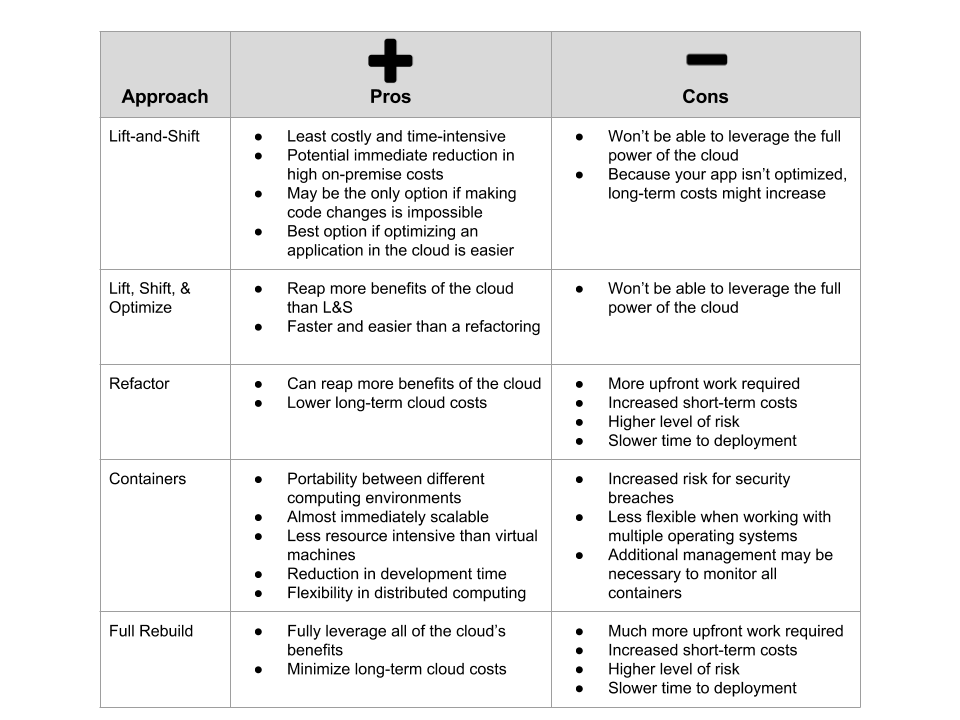
You’ve decided that migrating one or more applications to the cloud is necessary, and you’ve received the go-ahead from management to do so. So what approaches can you now take to execute your migration? You have five primary options you can choose to migrate your applications to the cloud:- The Lift-and-Shift Approach
- Lift, Shift, and Optimize
- Refactoring your app
- Containers
- Full rebuild of your app
- How much knowledge and experience do you have with cloud migrations?
- What level of resources can you dedicate to migrating your app(s)?
- How quickly do you need to migrate to the cloud?
- How much risk are you willing to take?

1) Lift-and-Shift Approach
The first way to migrate to the cloud is by using the “Lift-and-Shift” (L&S) approach. This is pretty much what it sounds like – lifting a portion of or an entire existing application from your on-premise infrastructure and shifting it to the cloud with few or no modifications to the underlying code. It’s a great way to get started with moving to the cloud, as there will be minimal disruption to the application you’re migrating. Additionally, the L&S model is a very good option for cloud disaster recovery, where you can leverage the cloud to backup your data without changing the application’s architecture. GE Oil and Gas used the Lift-and-Shift model to kick off their migration of over 500 applications to AWS in two years and saw cost savings of 30% without optimizations. As you can see, the L&S approach can still have a significant impact on your company even if it is the simplest option.Pros of Lift-and-Shift
The L&S approach is a great starting point in moving to the cloud. It’s the least costly and time-intensive method, and your team will obtain a wealth of valuable knowledge for larger, more complex cloud migrations in the future. Lift-and-Shift is also an effective way to immediately reduce high on-premise infrastructure costs in the short term, just like GE Oil and Gas did. There will be times where making code changes is impossible, such as if you’re looking to run off-the-shelf software in the cloud. In these cases, the Lift-and-Shift approach may be your only option. Finally, sometimes applications can be easier to optimize once they are in the cloud, so lifting and shifting may be the best option to get that application into the cloud quickly.Cons of Lift-and-Shift
The primary con of the Lift-and-Shift approach is that you won’t be able to leverage the full power of the cloud. Because your application wasn’t designed and built with the cloud in mind, it won’t be optimized to take advantage of the speed, agility, and scalability that the cloud has to offer. Additionally, because your application isn’t optimized for the cloud, it might consume more cloud resources than necessary. This could increase your cloud costs in the long term. Regardless, the Lift-and-Shift approach is a great way to get your cloud migration journey started.2) Lift, Shift, and Optimize
The Lift, Shift, and Optimize (LSO) approach is when you replicate your current application in the cloud but make minor tweaks and optimizations to improve your app. The LSO approach can be used when it’s clear that there are minor optimizations that can be made that won’t break your application. Otherwise, you may have to perform a full refactor (which we’ll talk about more in the next section), which is a much more involved process. An example of LSO is Sprint’s migration of their SMS messaging platform from on-premise to the cloud, which we helped with. The platform, which delivers over 3 million text messages per day, was complicated and had many components to it. And the company needed to continue to use the software while the cloud migration was occurring. So we believed that we could lift and shift many parts of the application to the cloud, then optimize once the platform was stable. And we continue to make improvements with ongoing optimizations to data warehouses, load balancing, and more.Pros of Lift, Shift, and Optimize
With the LSO model, you’ll reap more of the benefits of the cloud than if you were to just lift-and-shift your app, and it’s much faster and easier than a full refactoring. For example, in addition to moving your application from on-premise servers to Amazon EC2, you may also decide to move your data over to Amazon Aurora or RDS to lower the time and money you spend managing databases. This additional step won’t significantly impact your application but will help you garner additional perks of the cloud.Cons of Lift, Shift, and Optimize
The only con of the LSO approach is that your application isn’t fully optimized for the cloud, so you’re not taking advantage of everything the cloud has to offer. Your company may not realize all of the cost savings and enhancements to agility and flexibility that the cloud provides. Overall, the LSO approach falls right into the sweet spot between a traditional Lift-and-Shift and a full refactoring, which is a pretty good place to be. [thrive_leads id=’8366′]3) Refactoring
A refactoring entails making major changes to your application’s code or configuration in order to move it to the cloud without impacting its external behavior. There can be a couple of reasons for a refactoring:- The application, in its current state, is not fit to be run in the cloud. So you have to make significant code revisions in order to migrate it and have the app work properly.
- There is a strong need to add features, improve performance, or scale the application once in the cloud, and these improvements cannot be achieved in the application’s existing state.
Pros of Refactoring
When you refactor your app to migrate to the cloud, you can structure your code to take full advantage of everything the cloud has to offer. This will result in an app that is faster, more reliable, and more scalable. For instance, your old app may be hampered by a slow way of ingesting real-time data. If you choose to move to AWS, you can refactor your code to efficiently leverage Amazon Kinesis to more quickly process this data. Also, you can optimize your app to lower long-term cloud costs. When you refactor your app, you can design it so that it uses cloud compute, storage, database, and other resources more efficiently, which can significantly cut down on your costs over time.Cons of Refactoring
To achieve the speed, reliability, and lower long-term cost of a cloud application, you’ll have to perform more work upfront to refactor your app. This can be very costly in the near-term, since you’ll have to deploy additional engineers and other staff to get your app ready for the cloud. You’ll also assume a much higher level of risk compared to the more straightforward Lift-and-Shift and Lift, Shift, and Optimize options. Finally, because of all of the work you need to put into changing your application’s code, much more time will elapse until you can deploy your new app. While the refactoring approach will benefit you in the long term, you should thoroughly understand your short-term tradeoffs to decide if it’s the right choice for your company.