Learn how to put together a serverless Lambda web app using API Gateway, DynamoDB, and S3
There’s a lot of AWS talent in the Baltimore area, but it can be tough driving down to NoVa to attend AWS meetups. So we decided to start the Columbia AWS Meetup. And to kick off our first event, our VP of Software Development Dan Rusk covers how to create a serverless stack with Lambda. What we mean by “serverless” is that you can set up your app architecture without standing up any EC2 instances. This gives you two benefits:- You don’t have to pay for idle server uptime.
- Your app is elastic, meaning it can automatically scale up and down with spiky traffic. So you only pay for what you use.
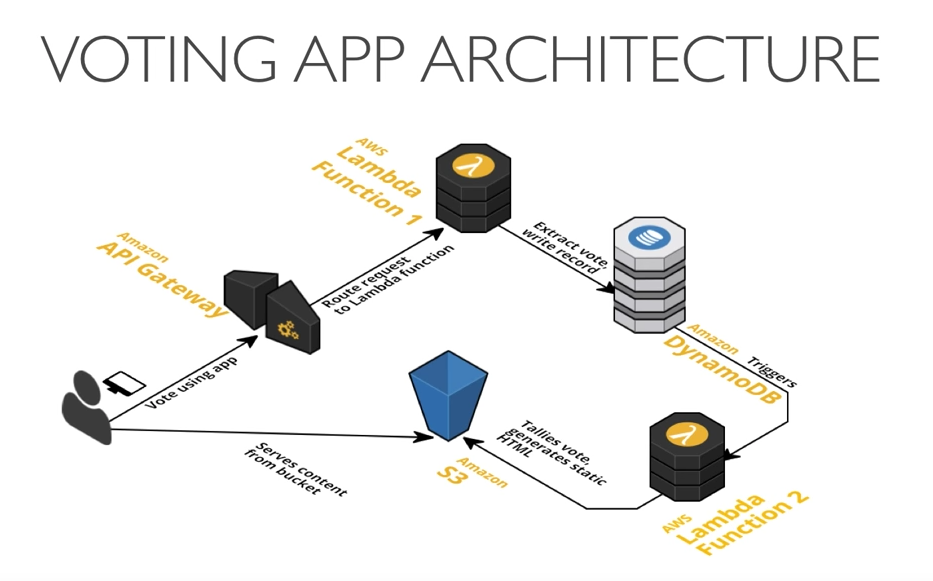
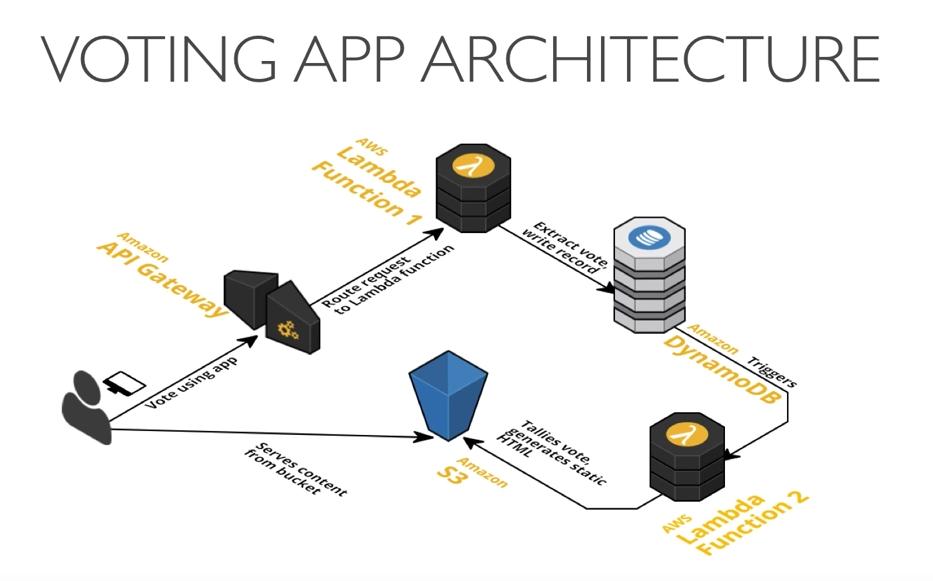
 The app architecture leverages a few AWS managed services. Managed services help you reduce cost and maintenance.
- API Gateway: This creates a POST endpoint for user votes, and forwards an event to Lambda.
- Lambda: These are scalable containers for the app. There are two Lambda functions: Function 1: Updates the database with a user’s vote Function 2: Updates the website with the latest results
- DynamoDB: The data is stored in a managed NoSQL database.
- S3: HTML/CSS/JS files are hosted as a website. A JSON file on S3 caches the latest tallies, which reduces the number of calls to DynamoDB.
 You can watch the recorded presentation on YouTube.
You can also check out the slide deck here:
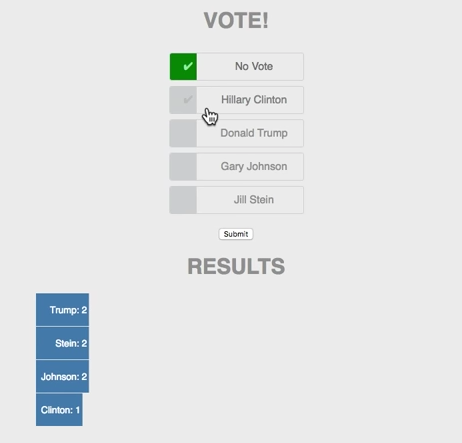
Here’s the sample code and the live demo site in action. This is a good opportunity to get some hands-on experience integrating several AWS services. You don’t need any experience with Node.js or React in order to follow along.
If you’re in the Columbia/Baltimore area, we encourage you to come to one of our AWS meetups — we have food and drinks. Otherwise, keep an eye out for more recorded presentations in future posts.
Got any tips for using AWS Lambda? Have any suggestions for future topics? Feel free to add your thoughts to the comments.
You can watch the recorded presentation on YouTube.
You can also check out the slide deck here:
Here’s the sample code and the live demo site in action. This is a good opportunity to get some hands-on experience integrating several AWS services. You don’t need any experience with Node.js or React in order to follow along.
If you’re in the Columbia/Baltimore area, we encourage you to come to one of our AWS meetups — we have food and drinks. Otherwise, keep an eye out for more recorded presentations in future posts.
Got any tips for using AWS Lambda? Have any suggestions for future topics? Feel free to add your thoughts to the comments.
Like this post? Please share it using the share buttons to the left. Then join our mailing list below and follow us on Twitter – @thorntech – for future updates.